Your report arrives by email from reports@levelrelay.com, the address our scan provider sends from. There is no mailing list behind this form.
What you get back
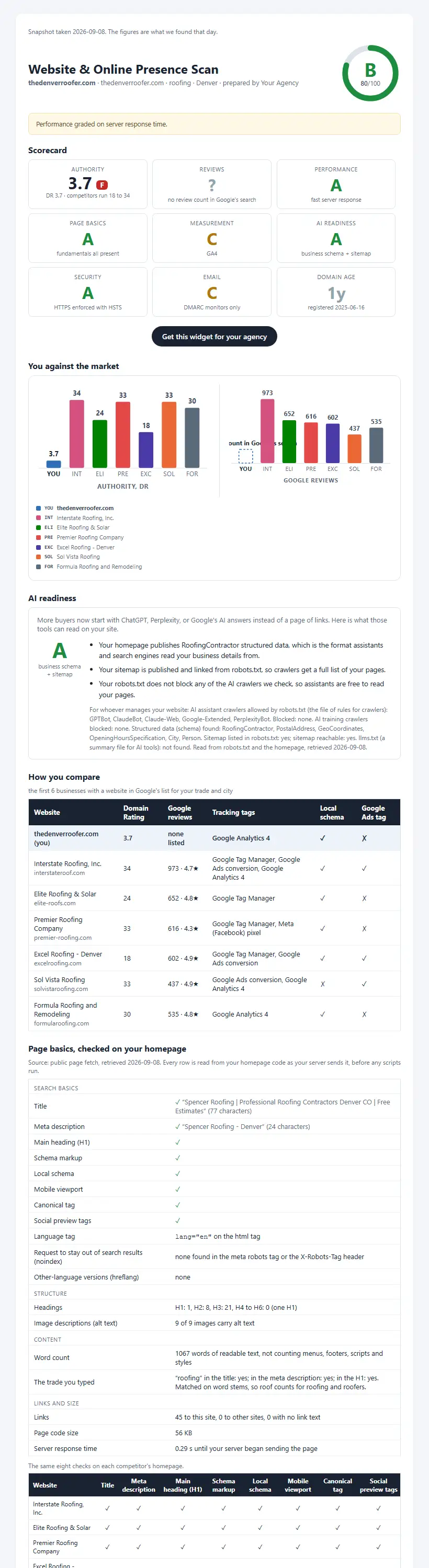
Why it is worth a minute
Not a grade in a vacuum. A grade against the businesses you lose jobs to.
Pulled from Google's own list for your trade and city while the scan runs, not typed in by hand.
Your authority, reviews, speed and tracking next to theirs, so you can see where the gap actually is.
Each check says what it measured, where the number came from, and the date it was read.
The full report, free. No teaser, no account, no sales call to unlock it.
What the report checks
Up to twelve checks, each one compared.
Plus AI visibility: when available, three AI models are asked which businesses they would name for your trade and city.
- 01Search authority
How much weight Google gives your site, next to the competitors it lists for your trade and city.
- 02Google reviews
Your review count and rating beside theirs, read the moment the scan runs.
- 03Page speed
How quickly your site loads on a phone.
- 04Google's SEO audit
Google's own score for whether your page can be found and indexed.
- 05Page basics
Title, description, headings and the other fundamentals search engines read first.
- 06Tracking and ads
Which analytics and ad tags are on your site, and on theirs.
- 07AI readiness
Whether ChatGPT, Perplexity and Google AI answers can read your business details.
- 08Accessibility
How easily people with disabilities can use the site.
- 09Website security
HTTPS and the basic protections a browser expects.
- 10Email protection
Records that stop someone sending fake email in your business name.
- 11Domain age
How long your web address has been registered.
- 12Google profile
What the scan found on your Google business listing.
How it works
- 01Tell it four things
Your website, what you do, where you work, and your email.
- 02It finds your competition
Google's list for your trade and city, looked up live. Add a competitor you know about if you like.
- 03Read your report
In about a minute, on the page and in your inbox.
Questions
- Is it actually free?
- Yes. The full report, no teaser version, no card, and no call required to see it.
- How long does it take?
- About a minute. The report opens on the page and a copy arrives by email.
- Who are the competitors?
- The scan looks up Google's list for your trade and city while it runs: the first business with a website, then the most reviewed of the rest. Nobody types them in. There is an optional box for one you lose jobs to.
- What if a check has no data?
- It shows as no data, never as a failing grade.
- What happens to my email?
- Your report is sent from [email protected], the address our scan provider sends from. There is no mailing list behind this form.